February 17, 2026 · Gaurav Radadiya
Your customers open 98% of WhatsApp messages within minutes. Your marketing emails? Maybe 20% if you are lucky. That gap is why Shopify stores are rapidly adding WhatsApp to their notification stack, and why 175 million people now message a business account on WhatsApp every single day (yCloud, 2026).
But setting up WhatsApp notifications on Shopify is not as simple as flipping a switch. You need the WhatsApp Business API, approved message templates, a Business Solution Provider, and a clear plan for which notifications to automate. Get it right and you unlock a direct line to your customers that outperforms every other channel. Get it wrong and you waste money on a channel that adds complexity without results.
This guide breaks down every type of WhatsApp notification available for Shopify stores, how to set them up, what they cost, and which apps make it easiest. Whether you want order updates, abandoned cart recovery, or back-in-stock alerts, here is everything you need to know.
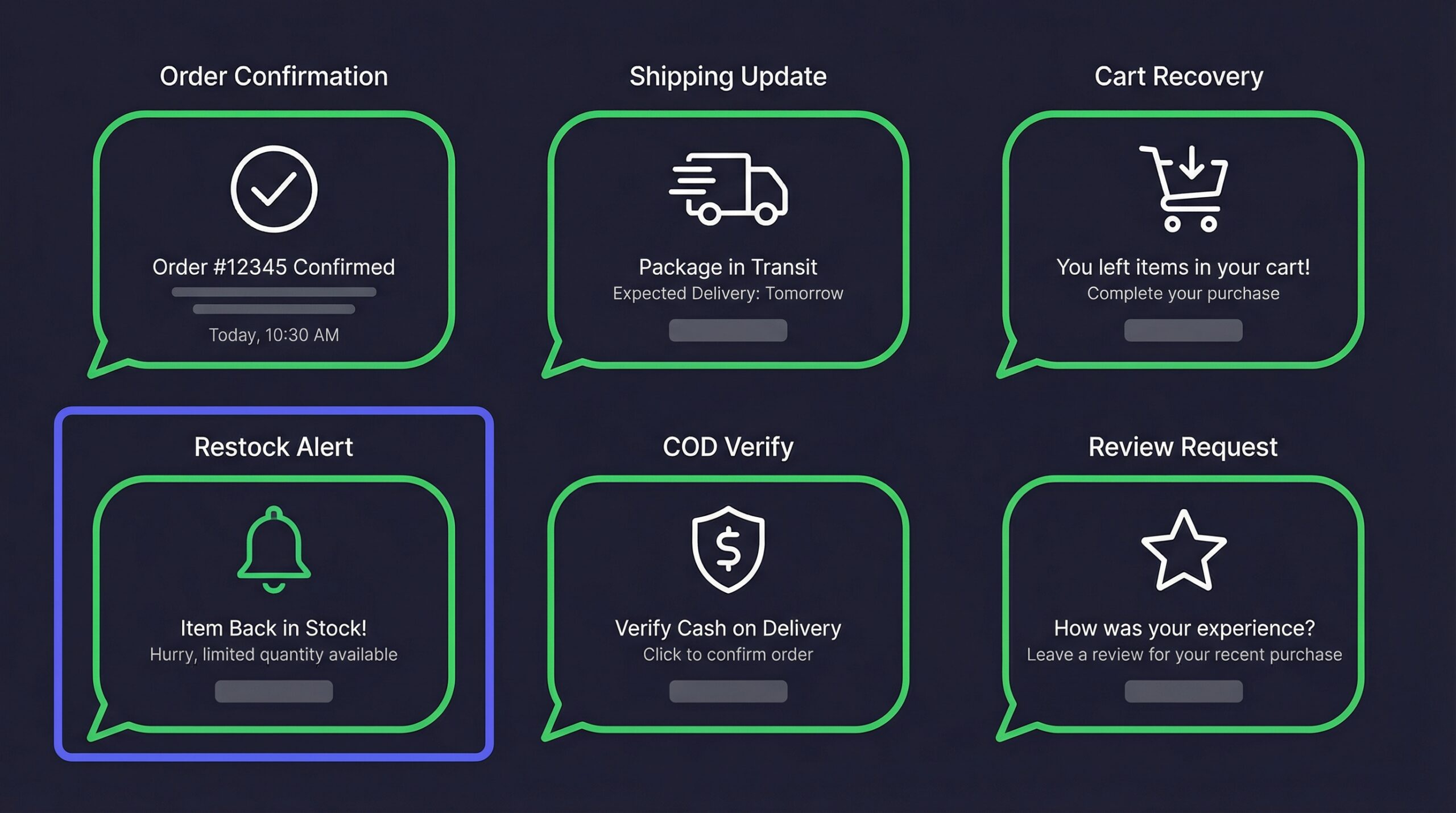
WhatsApp notifications are automated messages sent from your Shopify store to customers through the WhatsApp Business API. Unlike regular WhatsApp messages you send from your phone, these are template-based automated alerts triggered by specific events in your store.
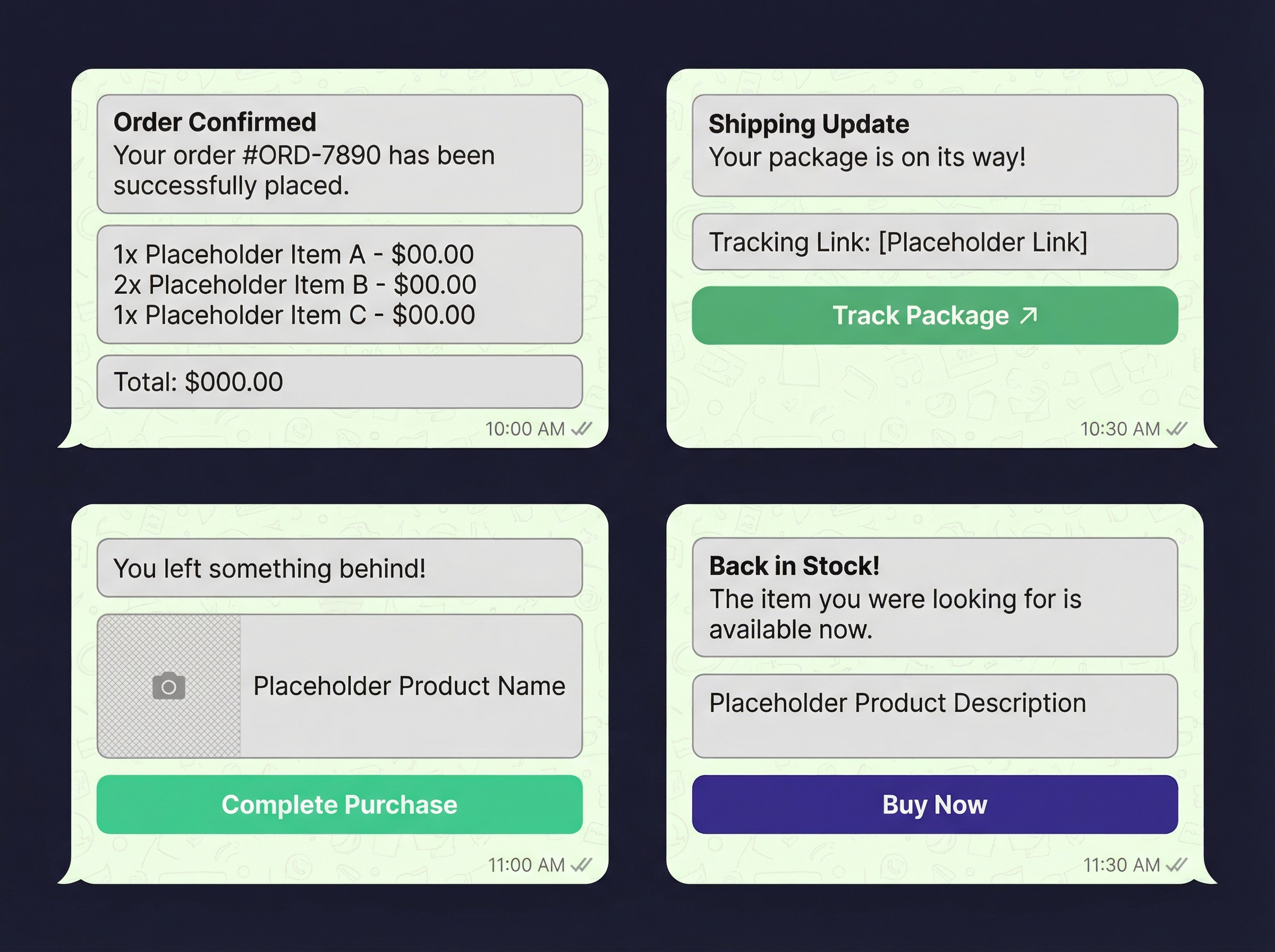
When a customer places an order, your Shopify store can automatically send an order confirmation via WhatsApp. When you ship their package, they get a tracking update. When an abandoned cart sits idle, they receive a recovery reminder. Each notification type uses a pre-approved message template that Meta reviews before you can send it.
The WhatsApp Business API is not the same as the WhatsApp Business App. The API is designed for medium to large businesses that need to send automated messages at scale. Here is the difference:
| Feature | WhatsApp Business App | WhatsApp Business API |
|---|---|---|
| Monthly cost | Free | $30-500+/month (BSP fees) |
| Message automation | Manual only | Fully automated |
| Integration with Shopify | No native integration | Yes, through BSPs |
| Message templates | Not required | Required and pre-approved |
| Bulk messaging | Limited to broadcast lists | Unlimited (with API) |
| Analytics | Basic | Detailed delivery and read reports |
For Shopify stores, the API is the only option that supports automated notifications. You cannot send automated order updates or cart recovery messages through the regular WhatsApp Business App.
Every automated WhatsApp message must use a pre-approved template. Meta reviews these templates to prevent spam and ensure quality. Templates include:
Template approval typically takes 24-48 hours. Most Shopify WhatsApp apps come with pre-built templates that are already approved, saving you the setup time.
Each notification type serves a specific purpose in the customer journey. Here is what each does and why it matters for your store’s revenue.
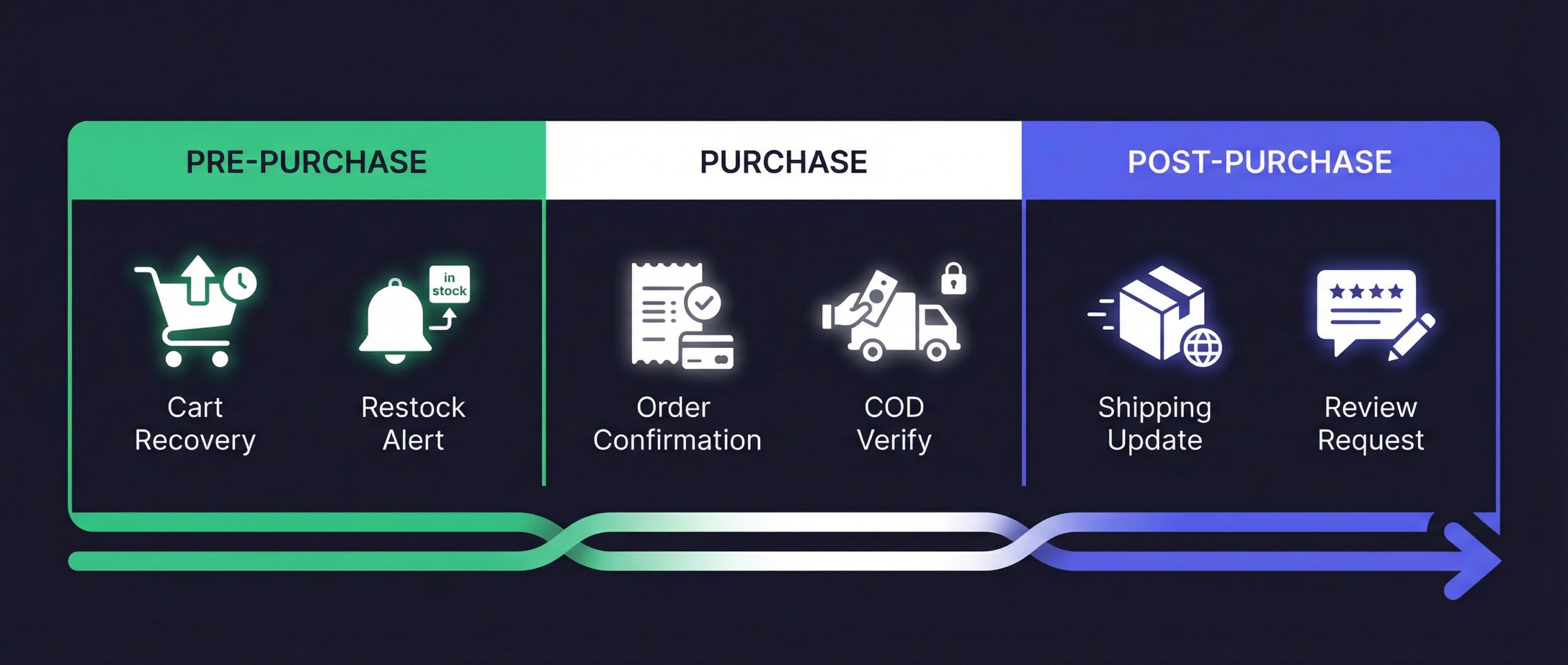
Trigger: Customer completes checkout
Business impact: Reduces “where’s my order” support tickets by 30-40%
The moment a customer completes their purchase, they receive a WhatsApp message confirming the order details. This includes the order number, items purchased, total amount, and estimated delivery date.
Why this matters: 53% of retailers already automate messaging over WhatsApp (Infobip, 2025), and order confirmations are the most common starting point. Customers check WhatsApp reflexively, so your confirmation message gets seen almost immediately versus sitting in an email inbox.
Trigger: Order status changes (shipped, in transit, out for delivery, delivered)
Business impact: Reduces WISMO (Where Is My Order) inquiries by up to 50%
Shipping notifications keep customers informed at every stage of delivery. The best implementations send updates at four key moments: order shipped, in transit, out for delivery, and delivered. Each message includes a direct tracking link.
WhatsApp shipping updates are particularly valuable for international orders where delivery takes longer. Customers who receive regular updates are less likely to contact support and less likely to initiate disputes.
Trigger: Customer adds items to cart but does not complete checkout (usually 1-24 hours later)
Business impact: Recovers 30-40% of abandoned carts
This is the highest-ROI notification type for most Shopify stores. WhatsApp cart recovery achieves up to 70% recovery rates in some implementations (Wapikit, 2025), compared to 7-11% for email cart recovery.
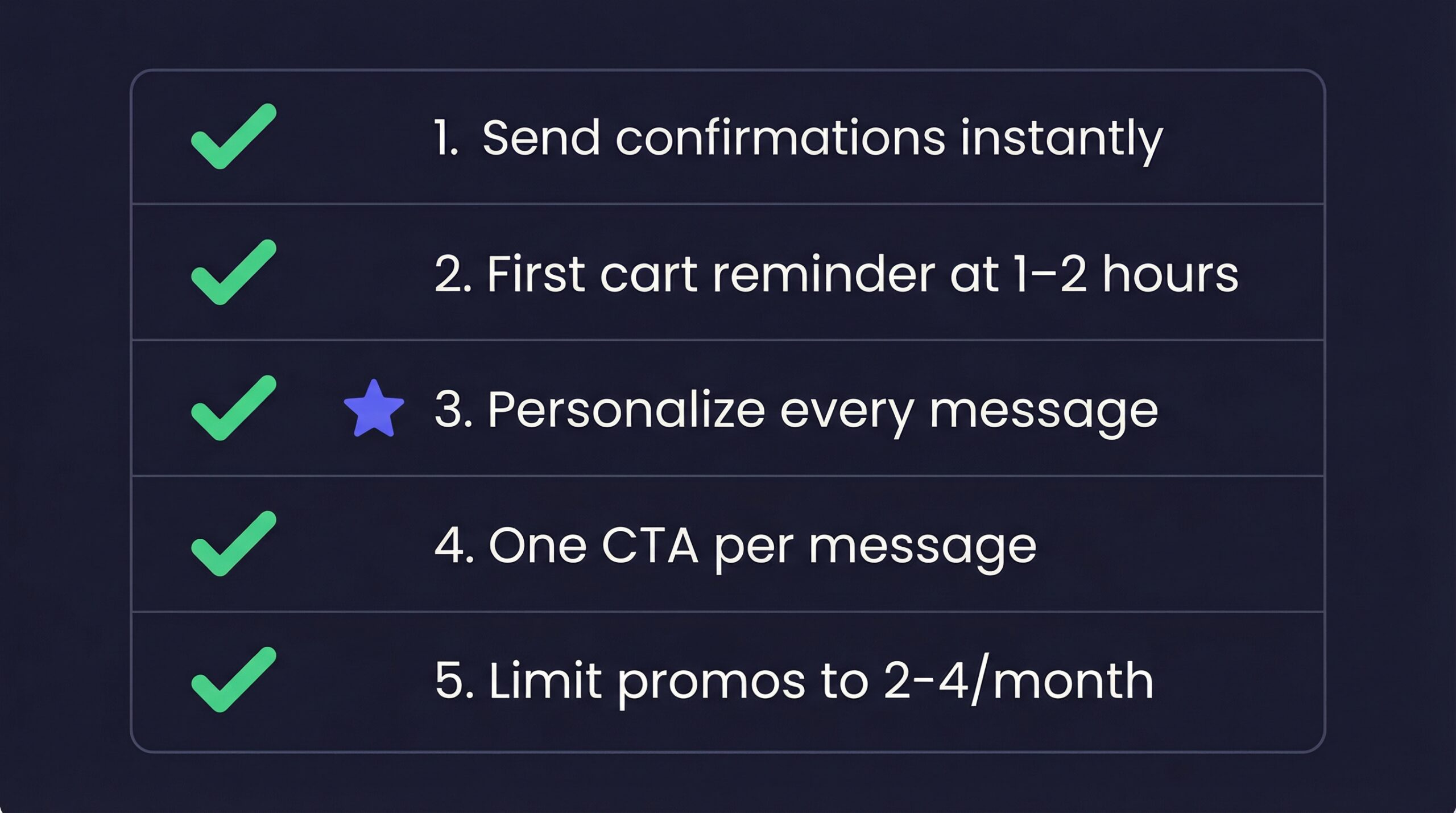
The timing matters. The first WhatsApp reminder should go out 1-2 hours after abandonment, with an optional follow-up at 24 hours. Including a direct link back to the cart and optionally a small discount code maximizes conversions.
Trigger: A previously out-of-stock product is restocked
Business impact: Recovers revenue from stockouts, highest conversion rate of any notification
Back-in-stock alerts on WhatsApp combine the urgency of the message with the intent of the subscriber. These customers already tried to buy once. When you tell them the product is available again, they act fast.
The speed advantage is critical here. Popular products that sell out once will sell out again. The first customers to see the restock notification get to buy. Customers who see it hours later via email may find it sold out again.
For a detailed comparison of WhatsApp vs email for this specific use case, see our breakdown of WhatsApp vs email for Shopify notifications. And for setup instructions, our guide on WhatsApp back-in-stock alerts on Shopify covers the full process.
Trigger: Customer places a Cash on Delivery order
Business impact: Reduces RTO (Return to Origin) rates by 25-40%
For stores that offer Cash on Delivery, order verification via WhatsApp is a game changer. The store sends a WhatsApp message asking the customer to confirm their COD order with a simple “Yes” reply or button tap.
This single step eliminates a huge percentage of fake orders and reduces costly return-to-origin shipments. In markets like India and Southeast Asia where COD is the dominant payment method, this notification type pays for itself almost immediately.
Trigger: Order delivered (typically 3-7 days after delivery)
Business impact: Increases review collection by 2-3x compared to email requests
Asking for reviews on WhatsApp converts significantly better than email because the message gets read. A simple “How was your experience with [product]?” message with a direct review link makes it easy for customers to respond.
The conversational nature of WhatsApp also means customers can reply directly with feedback, giving you qualitative insights that traditional review forms miss.
Trigger: Scheduled by the store (new product launch, flash sale, seasonal promotion)
Business impact: Higher engagement than email campaigns, but higher cost per send
Promotional WhatsApp messages achieve 45-60% click-through rates (Chatarmin, 2025), which is dramatically higher than email’s 2-5% for promotional content. However, these are also the most expensive message type under Meta’s pricing, and overusing them risks annoying your customers.
The best practice is to reserve WhatsApp promotions for truly important announcements: limited product drops, exclusive early access, and major sales events. Save routine marketing for email.
Setting up WhatsApp notifications involves four main steps. Most Shopify apps handle the technical complexity, but understanding the process helps you make better decisions.
If you do not already have one, you need a WhatsApp Business account connected to a phone number dedicated to your business. This number will be the sender for all your automated notifications.
Important: The phone number you use for WhatsApp Business API cannot simultaneously run the regular WhatsApp or WhatsApp Business app. You need a dedicated number.
A BSP is the bridge between your Shopify store and the WhatsApp API. You cannot connect directly to WhatsApp’s API without one. Most Shopify WhatsApp apps act as BSPs or partner with one.
When choosing a BSP, consider:
Most WhatsApp notification apps install directly from the Shopify App Store and connect to your store with a few clicks. The app then accesses your order data, customer information, and product catalog to power the automated notifications.
The connection typically requires:
Each notification type needs a message template. Templates include the message text, dynamic variables (order number, customer name, product name), and any buttons or links.
Write templates that are:
Most Shopify apps provide pre-built templates that are already approved or get approved within hours.
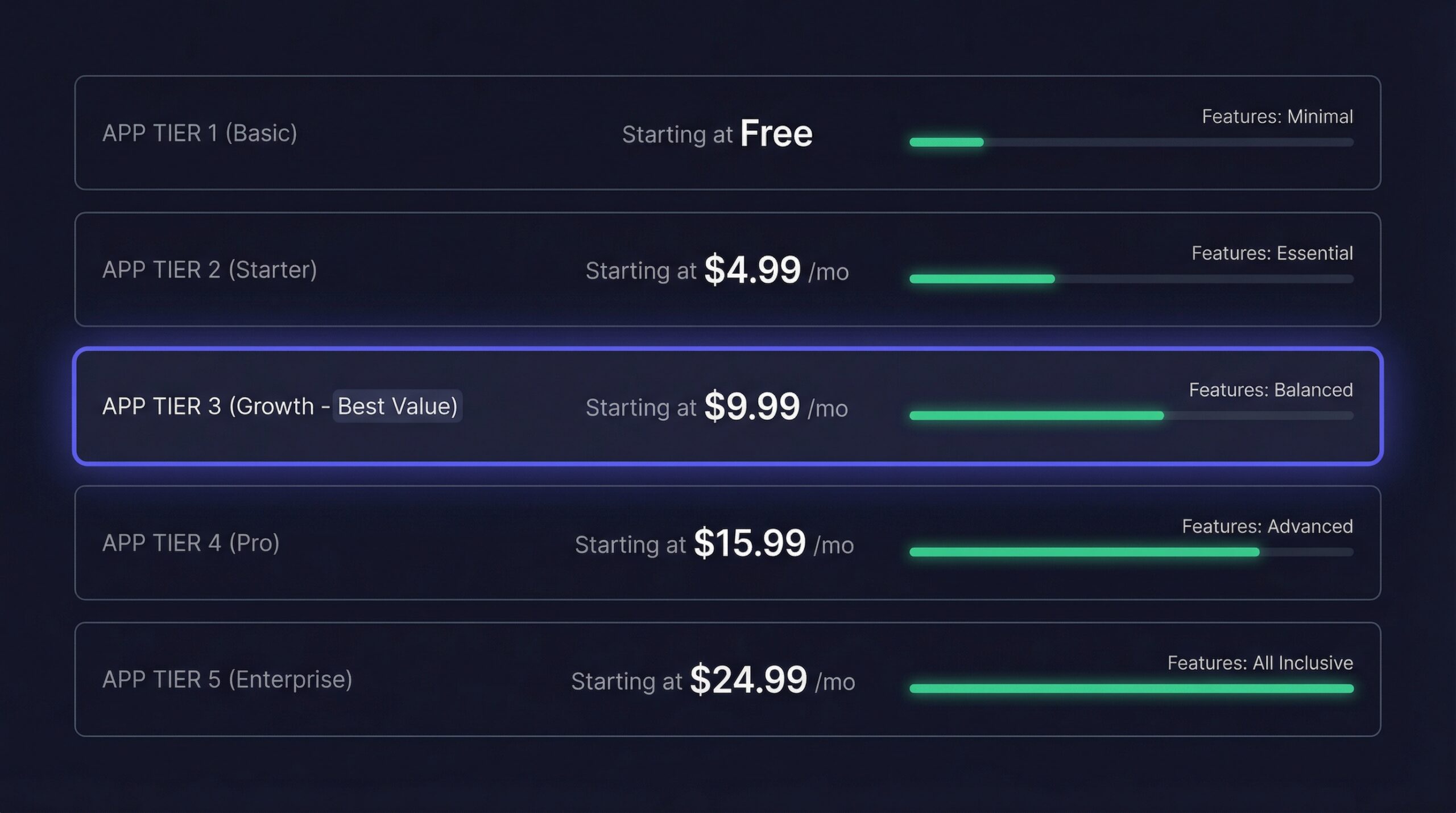
Here is a comparison of the top apps for sending WhatsApp notifications from your Shopify store:
| App | Starting Price | Key Features | Shopify Rating | Best For |
|---|---|---|---|---|
| Zoko | $39.99/month | Full CRM, in-app shopping, multi-agent support | 4.8/5 | DTC brands scaling WhatsApp as a sales channel |
| DelightChat | $49/month | Omnichannel helpdesk, AI assist, WhatsApp + IG + FB + Email | 4.6/5 | Support-focused stores wanting unified inbox |
| Interakt | $15/month | Marketing automation, campaigns, cart recovery | 4.5/5 | Budget-friendly WhatsApp marketing |
| WhatFlow | $9.99/month | Order updates, cart recovery, real-time notifications | 4.7/5 | Simple automated order notifications |
| SuperLemon | Free – $10/month | Chat button, order notifications, cart recovery | 4.3/5 | Small stores starting with WhatsApp |
Each app handles the WhatsApp Business API integration, template management, and message sending. The main differences come down to additional features like CRM, multi-channel support, and marketing automation.
For back-in-stock alerts specifically, StoreBeep supports both email and WhatsApp notifications from a single Notify Me button, making it easy to offer customers their choice of notification channel.
Understanding WhatsApp costs requires looking at two components: the BSP subscription and the per-message API fees.
Meta categorizes messages into four types, each with different pricing:
| Message Type | Cost Range | Shopify Use Case |
|---|---|---|
| Utility | $0.005-0.08/msg | Order confirmations, shipping updates |
| Marketing | $0.01-0.22/msg | Cart recovery, promotions, restock alerts |
| Authentication | $0.004-0.06/msg | COD verification, account verification |
| Service | Free (within 24h) | Customer-initiated conversations |
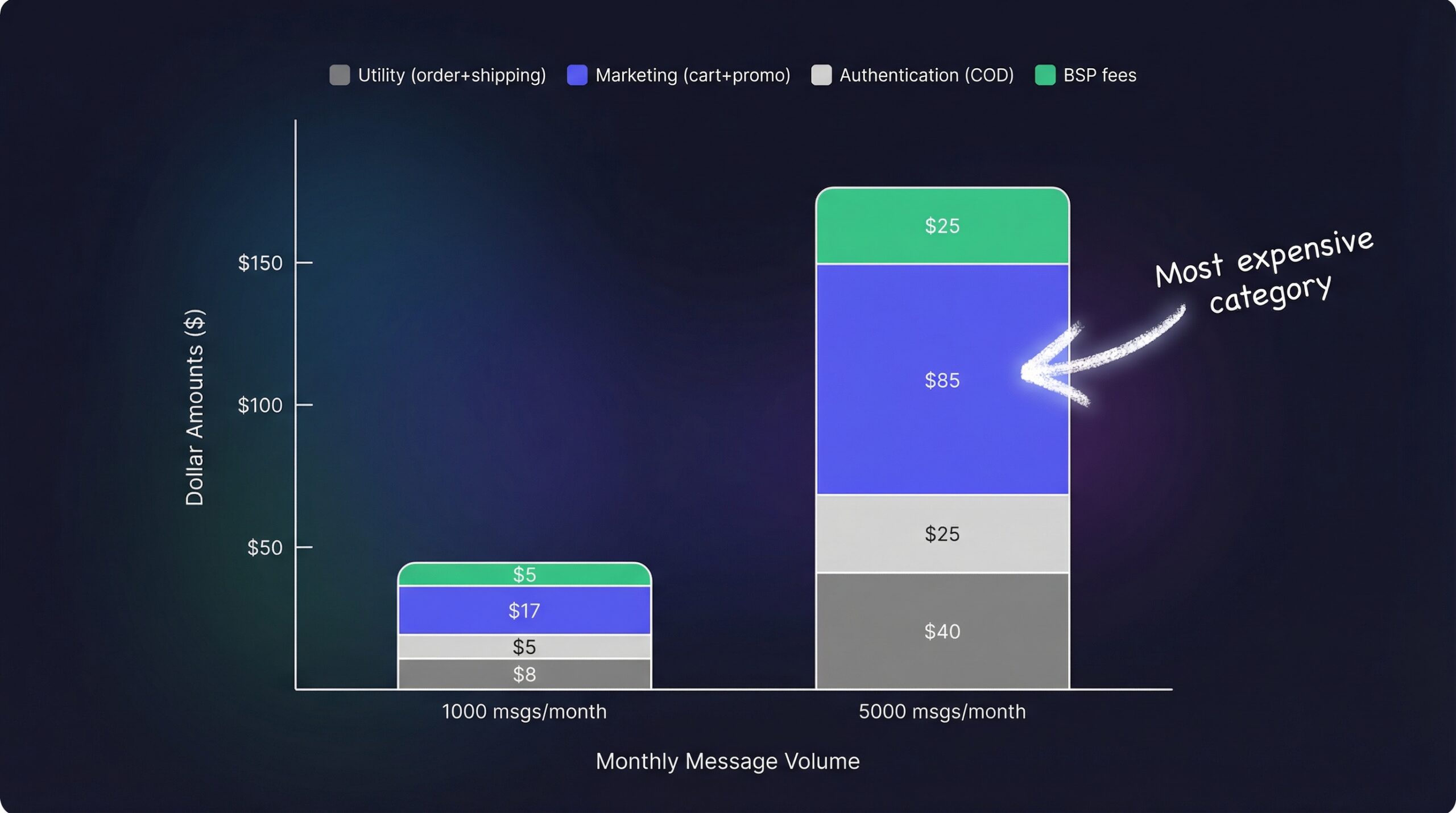
Marketing messages are the most expensive category. Utility messages (order updates, shipping) cost 50-95% less. This pricing structure means your order confirmation notifications are relatively cheap, but promotional campaigns add up fast.
For a store sending 1,000 WhatsApp notifications per month:
| Notification Type | Volume | Cost per msg (US) | Monthly Cost |
|---|---|---|---|
| Order confirmations | 500 | $0.015 (utility) | $7.50 |
| Shipping updates | 500 | $0.015 (utility) | $7.50 |
| Cart recovery | 200 | $0.05 (marketing) | $10.00 |
| Restock alerts | 100 | $0.05 (marketing) | $5.00 |
| Subtotal API fees | $30.00 | ||
| BSP subscription | $15-50 | ||
| Total monthly | $45-80 |
Compare that to email where the same 1,300 messages would cost $1.30-3.90 in sending fees plus $5-15 for the email platform. The cost difference is real, but so is the performance difference.
For a detailed cost-per-conversion analysis comparing both channels, see our WhatsApp vs email comparison for Shopify.
Use dynamic variables in every template:
Businesses that respond within 15 minutes see up to 80% higher conversion rates (Chatarmin, 2025). Set up auto-replies for customer-initiated messages so you never miss that window.
WhatsApp requires explicit opt-in before you can send notifications. This means:
Violating these rules risks getting your WhatsApp Business account suspended, which would cut off all your notifications instantly.
Yes. The regular WhatsApp Business App does not support automated messaging or Shopify integration. You need the WhatsApp Business API, accessed through a Business Solution Provider like Zoko, Interakt, or DelightChat.
Most templates are approved within 24-48 hours. Pre-built templates from Shopify apps are often pre-approved or approved within hours. Rejection usually happens when templates contain prohibited content or violate Meta’s commerce policy.
You can send to any country where WhatsApp is available, but pricing varies significantly. US messages cost around $0.05 for marketing, while India costs $0.01 and EU countries cost $0.10-0.22. Factor in your customer geography when budgeting.
The notification simply does not deliver. This is why most stores use WhatsApp alongside email, not as a replacement. Email reaches every customer regardless of which apps they have installed. Automated restock emails remain the foundation for most Shopify notification strategies.
New WhatsApp Business API accounts start with a limit of 250 business-initiated messages per 24 hours. As you establish a good sending reputation, this increases to 1,000, then 10,000, and eventually 100,000+ per day. Customer-initiated conversations do not count toward this limit.
Yes, as long as you have explicit opt-in consent. GDPR requires clear consent before sending marketing messages on any channel, including WhatsApp. Document your consent collection process and provide easy opt-out in every message.
Absolutely. Back-in-stock alerts are one of the highest-converting WhatsApp notification types because the customer already showed purchase intent. Apps like StoreBeep support WhatsApp restock alerts alongside email from a single notification form.
WhatsApp notifications give your Shopify store a direct, high-engagement channel that customers actually pay attention to. With 98% open rates and message read times measured in minutes rather than hours, WhatsApp outperforms every other notification channel on pure engagement.
The practical approach for most Shopify stores:
Over 50 million businesses already use WhatsApp to communicate with customers (yCloud, 2026). Your competitors are likely among them.
Set up back-in-stock notifications with both email and WhatsApp support today. Give your customers the notification channel they prefer and recover the revenue you lose to stockouts.
Keep reading